Your Video Memory Shouldn't Live on Someone Else's Cloud

Field notes from moving an entire 'watch a video, get a searchable multimodal memory' pipeline onto my own machine — capture, embedding, storage, search. One evening, three pitfalls, zero cloud services.
Contents
A hundred times I searched the crowd for her — then turned, and there she stood, where lantern light was dim.
—— Xin Qiji, “The Green Jade Table” (Southern Song dynasty; translation mine)
You’ve Seen That Frame Before
You know the moment. Three weeks ago you watched a tutorial, and somewhere in it was exactly the thing you need right now — a settings panel, an architecture diagram, a thirty-second demo. You remember what the frame looked like. You cannot remember which video, or which minute. Search won’t save you: search engines read titles and transcripts, not the picture in your head. So you scrub the progress bar back and forth until your patience runs out.
Last week the YouTube channel “小天fotos” (xiaotianfotos) published a video where he simply solved this. His open-source browser extension, Indexed, works while you watch: every ten seconds it slices the segment, embeds the frames and the subtitles into vectors, and files them into an index. Later you ask in plain language, describe a scene, or even paste a screenshot — and it lays out candidate segments with timestamps. One click jumps you to that exact second.
I watched it and had one thought: I want this.
The Step I Couldn’t Take
Before installing, I did what I always do and read through the architecture. One thing stopped me: in the current release, the vectors go to Alibaba Cloud’s object storage.
To be fair, the design isn’t wrong. The author did the math — indexing his ~5 hours of video costs a few cents per month. Practically free. But which videos you watched, down to the second is a profile of you. And I’ll say it plainly: I don’t trust Chinese cloud services with that kind of data. That’s my personal trust judgment — yours may differ. Which is exactly the problem with there being only one road.
Normally that leaves two options: wait for the official local version (he says it’s coming), or walk away. I took a third: open the source and see what’s actually missing.
Only One Piece Was Missing
Here is the best plot twist of the whole evening: the local-mode client was already written. Inside the extension sits a complete branch — point it at a local URL in the settings, and it will send everything there: video segments, subtitles, search queries, through eight clean HTTP endpoints.
It was waiting for a server that nobody had shipped yet.
So what I built that night wasn’t a replacement. It was the table’s missing fourth leg:
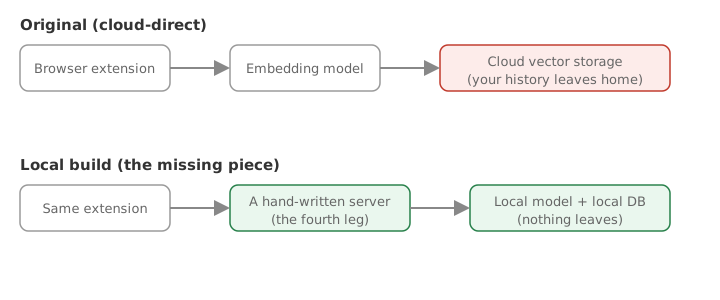
Same extension, two roads. The only difference is whose machine the right-hand boxes live on.
The server itself is not complicated. A video segment arrives — pull one representative frame, embed it. A subtitle arrives — embed the text. Everything lands in an embedded local vector database; a query gets embedded the same way and finds its nearest neighbors. The embedding model is Google’s open-weight SigLIP 2 — it handles multilingual queries, and on a plain laptop with no discrete GPU it takes 0.06 s per text and 0.3 s per image (measured 2026-08-28). Comfortably faster than the ten-second capture rhythm.
Three Pitfalls, One Evening
It wasn’t a straight line. Three pitfalls worth writing down:
Pitfall one: the model I wanted wouldn’t install. My first choice shipped custom modeling code that broke against the current toolchain — an internal function it imported had been removed upstream. Switching to SigLIP 2 turned out to be an upgrade, not a compromise: it’s natively supported, which means no third-party dynamic code executes at all. For something strangers will install, that’s a security property.
Pitfall two: the database spoke in tongues after a model swap. My test stub emitted 64-dimensional vectors; the real model emits 768. Mixing them in one database produced a cryptic low-level Arrow error. The fix wasn’t to swallow the error — it was to check dimensions at startup and fail in plain language: “Existing index is 64-d, current model outputs 768-d; a new model needs a new data directory.” Error messages are written for the stranger, and for yourself three months from now.
Pitfall three: my own tests polluted the real data. That 64-d data from pitfall two? My smoke test left it there, because test data and real data shared a directory. A mine I had buried for myself. The lesson is ancient and always true: tests get their own sandbox.
With those three fixed, the pipeline ran end to end: store the subtitle “testing the graphics card’s thermals and benchmark scores,” query with entirely different wording — “GPU temperature and performance test” — and the right segment ranks first.
The whole thing is open source at bockybocky/indexed-local-server (MIT): one Python file, no web framework. You’re welcome to try it —
- Build and load the Chrome extension per the upstream project’s instructions
- Clone my repo,
pip install -r requirements.txt, runpython server.py(first run downloads a ~1.5 GB model) - In the extension settings, pick local mode, point it at
http://127.0.0.1:8321, open a YouTube video and hit record
From then on, your video memory lives only on your own disk. If you get stuck installing, or just want to talk it over, open an issue — I’d genuinely like to hear how it goes.
Where “This Kind of Thing Needs the Cloud” Came From
One question outlasts the code. We carry a deep default: features like “AI remembers everything for you” obviously require a cloud, a subscription, and handing your data over.
That belief has a birthplace, and for over a decade it was correct. Models were closed and only ran in corporate data centers; if you wanted intelligence, you traded data for it. The entire subscription-software era was built on that trade.
Both premises have loosened. Open-weight models are now abundant, and an ordinary laptop CPU runs the good-enough ones. Once intelligence can happen on your own machine, “data for features” stops being a law of nature and becomes one option among several. You can still choose the cloud — but it should be a choice you weighed, not the only road.
This little project is one data point: the same feature, in a version where nothing leaves home, took one evening to complete. What was missing was never the technology. It was someone bothering to check which piece was actually missing.
One Thing to Take With You
What stayed with me was the moment I opened the source: the local-mode client was already written, waiting for a server. That’s what got me to stop abandoning a tool the moment I hit a design I dislike — what makes me want to leave is usually one part, and there’s often a socket right next to it.
A small thing you could try today: next time you’re about to hit “cancel subscription” or delete an app, first write one sentence on paper naming exactly which part you resent — something like “it insists on storing my history in its cloud.” Then spend five minutes in its settings or help page looking for a switch, an export, or a local option for that one part. Found or not found, note it beside the sentence.
The first time I did it was with a note-taking app. Writing the sentence made me realize my gripe was only the sync, and turning sync off was the third item on the settings page. In three months, look back over those lines and count how many times you didn’t actually need to walk away.
Comments
Loading comments…